How GymBuddy Works



GymBuddy is designed to keep training simple, structured, and progressive.
There are no complicated profiles — just clear settings that shape your training experience.
1️⃣ Set Your Training Goal
Go to Settings → Training Goal
Choose the focus that fits you right now:
-
Strength – focus on lifting heavier weights
-
Muscle Growth – build size through hypertrophy
-
Tone – improve definition and conditioning
Your selection influences how you approach your workouts.
2️⃣ Choose Weight Units
Under Weight Units, select:
-
KG (kilograms)
-
LB (pounds)
GymBuddy will track all your lifts in your selected unit.
3️⃣ Set Your Workout Duration
In Workout Duration, choose:
-
40 minutes
-
50 minutes
-
60 minutes
Or fine-tune using the + and – controls.
This helps structure your session length.
4️⃣ Select Weekly Frequency
Choose how many days per week you plan to train:
-
3 days
-
4 days
-
5 days
-
6 days
Consistency is key. Pick a schedule you can realistically maintain.
5️⃣ Pick Your Color Theme (Optional)
Customize the look of the app:
-
Nightfall
-
Sky Blue
-
Blush Pink
This does not affect training — just your visual experience.
6️⃣ Choose Your GymBuddy Avatar
Go to the Buddy section and select your training partner.
Choose:
-
Male
-
Female
You will start with Avatar 1 unlocked.
As you complete workout sessions and earn badges, new avatars will unlock automatically.
Each unlocked avatar represents your progress and consistency.
There are 18 total avatar levels to unlock.
Train consistently. Earn badges. Level up your Buddy.
7️⃣ Start Your Workout
Go to the Home section.
Here you will see:
-
Your selected GymBuddy avatar
-
Today’s workout focus (muscle groups)
-
Workout duration and number of exercises
-
Your weekly progress
-
Total sessions completed (all time)
This screen gives you a clear overview of your current progress.
When you’re ready, press Start Workout.
You will be taken directly into your training session.
8️⃣ Start Workout
This is where your training session happens.
Inside Today’s Workout, you will see:
-
The planned exercises for the day
-
The required sets and reps
-
A Start button for each movement
The workout is pre-structured based on your selected settings.
Exercise Alternatives
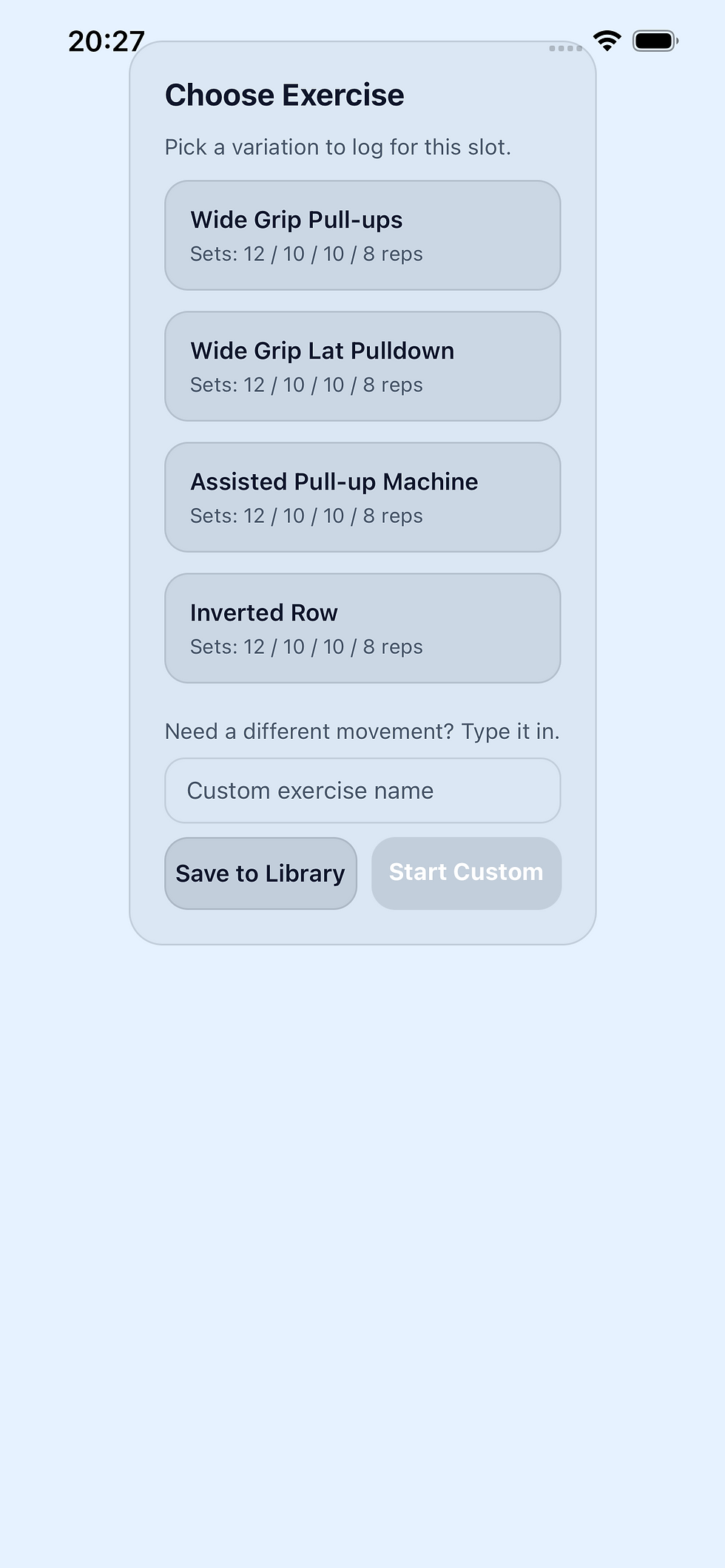
Each exercise includes alternative variations.
If a machine or equipment is unavailable in your gym, simply tap the exercise name and choose another variation.
You can also:
-
Add a custom exercise
-
Save it to your personal library
This keeps your training flexible without breaking your plan.
Mark Exercises as Completed
As you finish each exercise:
-
It will be marked as Completed
-
Your session progress updates automatically
When all exercises are completed, you will receive a badge as a reward for finishing the workout.
Consistency earns progress.
🔹 Inside an Exercise
When you open an exercise, you will see:
-
The number of reps for the current set
-
The weight for the set
-
A progress bar showing how many sets are left
When you are ready, press Start Set.
Complete your reps.
When finished, press Set Completed.
⏱ Rest Timer
As soon as you complete the set:
-
The rest timer starts automatically
-
Your target rest time is displayed
-
The upcoming set weight and reps are shown
This allows you to prepare your next weight during the rest period.
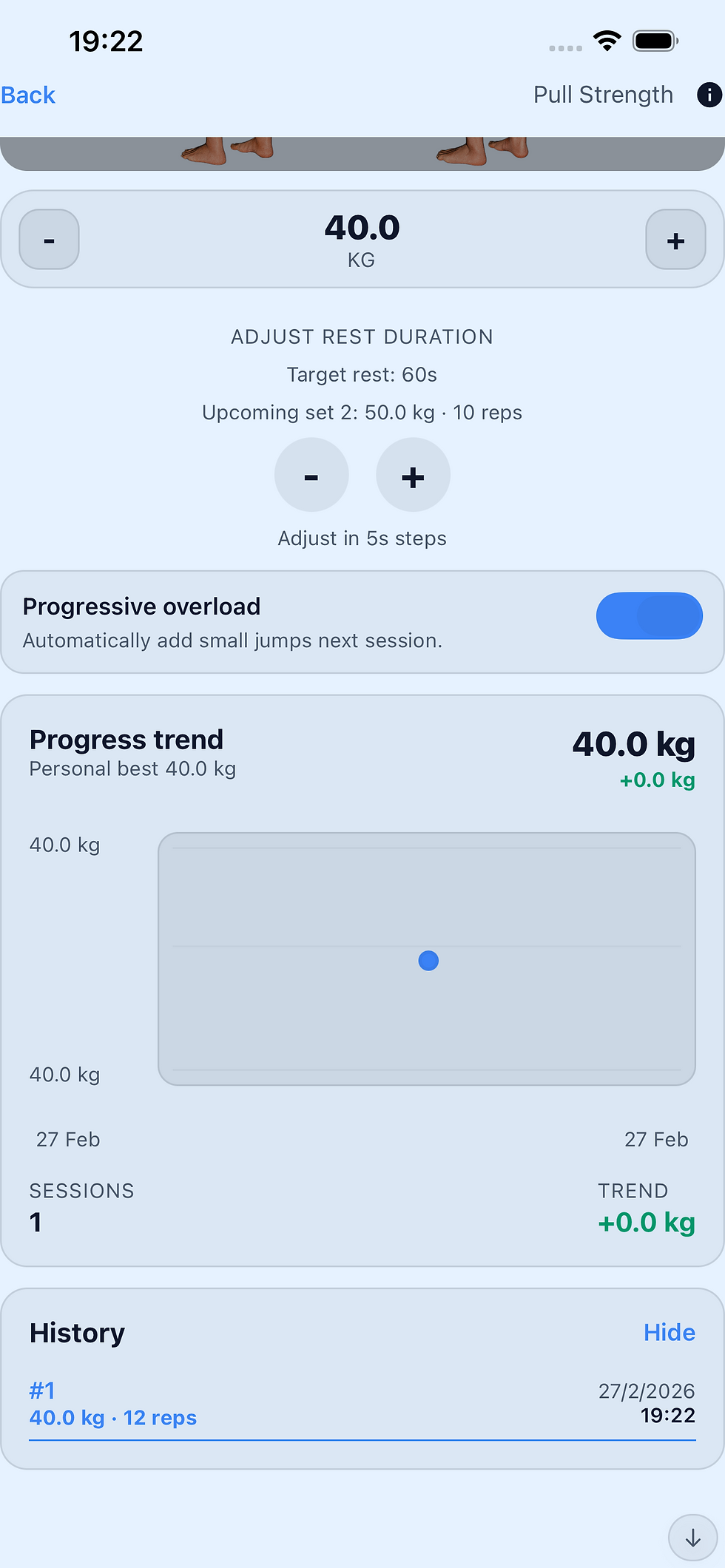
You can also adjust the rest duration in small increments if needed.
📈 Progressive Overload
If enabled, GymBuddy will automatically suggest small weight increases for your next session.
This helps you improve gradually and consistently over time.
9️⃣ Exercise Guidance & Tips
Every exercise includes:
-
Visual demonstration images
-
An “i” information icon
If you tap the “i” icon, a detailed explanation will appear showing:
-
How to set up correctly
-
Proper body positioning
-
Key technique cues
-
Safety recommendations
This helps you perform each movement with correct form and reduce the risk of injury.
If you are unsure about a lift, always review the guidance before starting your set.
Train smart. Train safely.
🔟 Pyramid Structure & Warm-Up Sets
GymBuddy workouts follow a pyramid structure.
Each exercise starts with a lighter warm-up set to prepare your muscles and improve technique.
From there, the weight gradually increases across the sets.
Typically:
-
Set 1–2: Lighter weight (warm-up & preparation)
-
Set 3–4: Heavier working sets (near your lifting max for the day)
This structure helps you:
-
Reduce injury risk
-
Activate muscles properly
-
Perform better on your heaviest sets
You can adjust the weight manually at any time.
However, avoid going too heavy on the first two sets — they are designed to prepare you, not exhaust you.
Train smart. Build progressively.
1️⃣1️⃣ Track Your Progress
Every exercise includes a History option.
By opening it, you can see:
-
Your personal best
-
Progress trend over time
-
Weight changes between sessions
-
A full log of previous sets and reps
-
Date and time of each workout
This allows you to clearly track improvement and identify patterns in your training.
The progress trend shows whether you are increasing weight consistently — which is key for long-term strength and muscle development.
Use your history to:
-
Aim for small improvements
-
Beat your previous performance
-
Stay motivated by visible progress
Progress is built session by session
1️⃣2️⃣ The GymBuddy Philosophy
GymBuddy is built around one core principle:
Small, consistent improvements over time.
You don’t need extreme workouts.
You don’t need random routines.
You need structure, progression, and consistency.
With GymBuddy you:
-
Follow a clear workout structure
-
Track every set and rep
-
Progress using smart overload
-
Visualize your improvement
-
Earn badges and unlock new avatar levels
Each session builds on the last.
The goal is not to train harder every day —
the goal is to train smarter, consistently.
Show up.
Complete your workout.
Improve slightly.
Repeat.
That is how real transformation happens.